
Adobe Commerce for B2B Distributors: 2026 Implementation Guide


If you run digital at a distributor, you already know the order is moving online whether your platform is ready or not. Your buyers reorder at 11 p.m., compare your fill rates against three other suppliers, and push purchases through procurement systems you don't control. The question isn't whether to build real B2B commerce. It's which platform can carry your pricing rules, your ERP, and your account structure without breaking on the next upgrade.
Adobe Commerce (formerly Magento Commerce) is an enterprise platform with a native B2B suite: company accounts, shared catalogs, customer-specific pricing, quotes, requisition lists, and purchase-order approvals. It's built for distributors with big catalogs and deep ERP dependencies. In 2026 it runs three ways: the established PaaS, the new SaaS model (Adobe Commerce as a Cloud Service, or ACCS), and Adobe Commerce Optimizer (ACO), a composable storefront layer you can add without re-platforming.
What Adobe Commerce B2B is, and why distributors pick it
Adobe Commerce is Adobe's enterprise commerce platform, built on the Magento codebase Adobe bought in 2018. It serves both B2C and B2B, but the B2B module is what matters to distributors. It adds wholesale workflows on top of the core engine instead of making you build them from scratch.
That gap is the whole point. The free Magento Open Source edition gives you a solid B2C store but none of the B2B suite. Company accounts, shared catalogs, negotiated quotes, and approval chains live in the paid Adobe Commerce edition. For a distributor, those aren't extras. They're the product.
Three reasons distributors land here:
The B2B model is native. Multi-buyer accounts, role permissions, customer-specific catalogs and pricing, and order approvals ship with the platform. You configure them rather than rebuild them.
It handles scale. Distributors carry tens or hundreds of thousands of SKUs with contract pricing, regional tiers, and volume breaks. Shared catalogs and tier pricing are designed for exactly that.
It's built to integrate. Your site is only as good as its link to inventory, pricing, and orders. Adobe's tooling (API Mesh, App Builder, the Integration Starter Kit) exists to wire commerce into an ERP-first back office.
Why distributor commerce is a different problem
A bit of context for the budget conversation, because the case is stronger than most stakeholders assume.
The global B2B ecommerce market is on track to hit roughly $36 trillion in 2026, growing about 14.5% a year. In the U.S., total B2B sales passed $15 trillion in 2025, B2B ecommerce grew 13% to $2.93 trillion, and more than 90% of B2B transactions are now electronic. One caveat for any board deck: these figures vary a lot by scope, since some count web-only orders and others fold in EDI and e-procurement. Cite the basis, not just the headline.
The behavior shift should worry leadership more than the topline. Around 75% of B2B buyers say they'd switch suppliers for a better digital experience, and 84% expect suppliers to support several sales channels at once. Self-service is the floor now, not a perk. The moat isn't your catalog or your reps anymore. It's whether a buyer can log in, see their contract price, reorder in three clicks, and have it flow into their procurement system without a phone call.
A distributor's requirements differ from a typical brand's in a few specific ways:
- Pricing is never one price. Contracts, tiers, volume breaks, and regional deals all coexist.
- The buyer is an organization, with multiple users, spending limits, and approvals inside one account.
- The catalog is huge and technical. Parts, specs, fitment, and reorders dominate.
- The ERP is the source of truth, and channels overlap: web, EDI, e-procurement, and field sales all touch the same accounts.
The native B2B features that matter
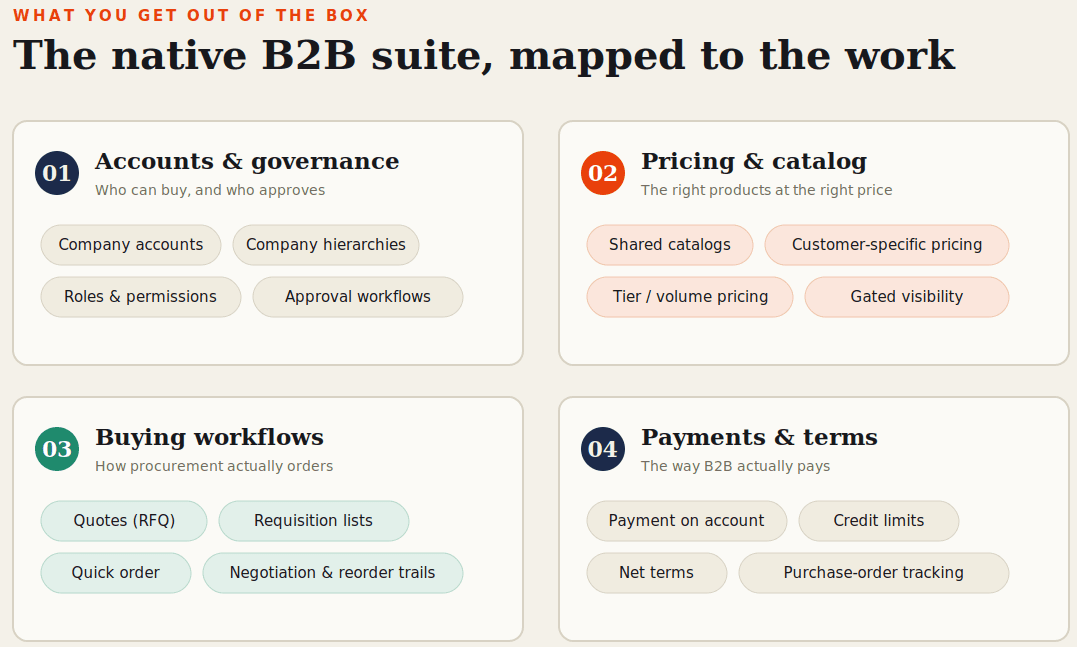
Here's what the platform does for wholesale, mapped to the problem each piece solves.
| Capability | What it does | Why it matters to a distributor |
|---|---|---|
| Company accounts and hierarchies | Models an org (buyers, approvers, finance, admins) and groups related branches | Mirrors how customers buy and who can spend |
| Shared catalogs | Gated, company-specific catalogs with custom pricing | Shows each customer their products at their price |
| Tier and contract pricing | Volume, segment, and contract price lists | Replaces spreadsheet pricing and manual quotes |
| Quotes (RFQ) and quick order | Buyer-initiated quotes, plus order-by-SKU | Digitizes custom orders and procurement buying |
| Requisition lists | Saved lists of frequent orders | Turns repeat buying into a few clicks |
| Purchase orders and approvals | Spending controls, multi-step sign-off, net terms | Gives finance teams the governance they need |
A few that distributors lean on hardest:
Company accounts and hierarchies are the foundation. An account models the real buying org: who orders, who approves, who handles finance. For multi-branch customers, hierarchies group related companies under one umbrella. Settle role boundaries early, and test what happens when someone edits a cart after submitting it.
Shared catalogs and customer-specific pricing retire the "email the rep for a price" routine. You govern visibility and pricing at the company level without cloning storefronts. Model the pricing rules carefully, because this is where most discovery time should go.
Quotes, requisition lists, and quick order digitize the three common buying motions: large or custom orders, recurring purchases, and paste-a-SKU-list checkout.
Purchase orders and approval workflows give buyers the spending controls their finance teams require, which is what makes them comfortable moving volume online.
One honest note. The native suite covers the wholesale fundamentals better than most competing platforms do out of the box. Programs rarely fail on missing features. They fail when business policy never gets translated cleanly into the platform during setup.
The integration question: ERP, PIM, EDI, punchout
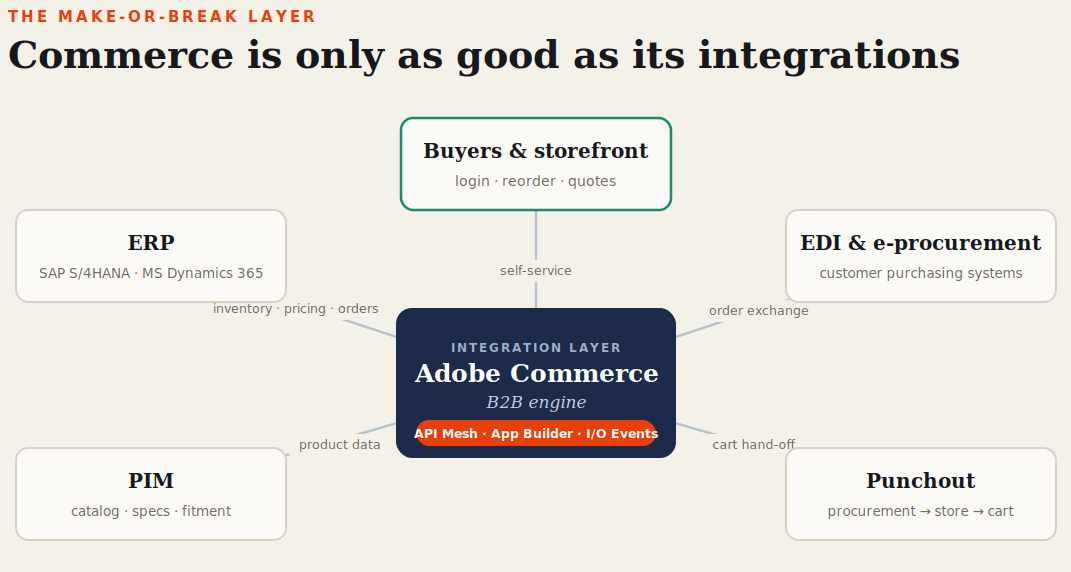
For a distributor this is the whole ballgame. A pretty storefront showing wrong inventory is worse than no storefront.
Adobe handles it with an API-first toolset instead of point-to-point code. The Integration Starter Kit (released in 2024) speeds back-office integration through App Builder, with reference connectors for SAP S/4HANA and Microsoft Dynamics 365 Finance. API Mesh combines Adobe and third-party APIs into one graph. App Builder and Adobe I/O Events let you build custom integrations and react to events without touching core code, which keeps you upgrade-safe.
Four questions decide the project:
- How often does inventory, pricing, and order data sync, and does that cadence match how fast orders and approvals happen? Mismatched timing is the top cause of "it said in stock but it wasn't."
- Where does authoritative product data live, and how does rich content (specs, fitment, documents) reach the storefront?
- How does the platform coexist with the EDI and e-procurement flows your biggest customers already use?
- Do enterprise buyers need punchout, dropping from their procurement system into your store and back with the cart intact?
Score any platform, and any partner, mainly on proven experience with your exact ERP and PIM. That counts for more than a slick storefront demo.
What changed in 2026
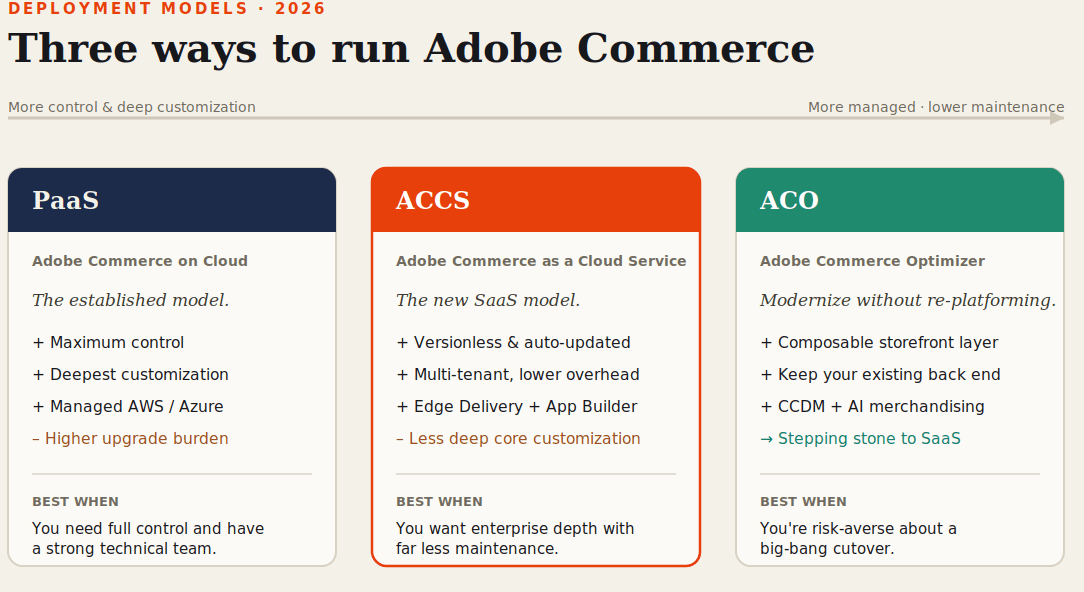
This is where a 2026 decision differs from a 2023 one, and where older comparisons are out of date.
At Adobe Summit 2025, Adobe announced Adobe Commerce as a Cloud Service (ACCS), a full SaaS model, and Adobe Commerce Optimizer (ACO), a composable storefront layer. There are now three ways to run the platform.
PaaS (Adobe Commerce on Cloud) is the established model: the most control and customization, managed hosting, but you carry more of the upgrade work.
ACCS is Adobe's versionless, multi-tenant SaaS platform bundled with Edge Delivery Services and App Builder. You trade some deep customization for much lower maintenance.
ACO is a composable storefront layer that modernizes the front end without replacing the back end, with a Composable Catalog Data Model and AI merchandising. Adobe frames it as a stepping stone to SaaS.
The takeaway for a distributor: you no longer have to choose between a heavy monolith and a full re-platform. Optimizer is a real middle path. You can modernize storefront speed, SEO, and merchandising first, then migrate the back end on your own schedule. If a big-bang cutover scares you, that changes the math.
There's a second 2026 development worth your attention if you want to be found in AI search. At Adobe Summit 2026, Adobe leaned into agentic commerce, a Commerce MCP Server, and product discovery inside LLM channels like ChatGPT, Gemini, and Perplexity. For a distributor that's not a gimmick. If a buyer asks an AI assistant who supplies a part in stock nearby, the suppliers feeding structured, machine-readable product and availability data into those channels win the shortlist. Discoverability is becoming a procurement issue, not just a marketing one.
Adobe Commerce vs. the alternatives
No platform fits everyone. For deeper head-to-heads, see our Commercetools vs. Adobe Commerce and Adobe Commerce vs. Shopify comparisons.
| Platform | Best fit when… | Trade-offs |
|---|---|---|
| Adobe Commerce | You need a deep native B2B suite plus heavy ERP/PIM integration and catalog depth | Higher cost; needs a skilled team or partner |
| Commercetools | You're committed to a fully composable MACH build | Less B2B out of the box; steeper learning curve |
| SAP Commerce Cloud | You're already deep in the SAP ecosystem | Heavy, expensive, long implementations |
| BigCommerce B2B | You want lower cost and a faster launch for mid-market B2B | Less depth at the high end; plan-based pricing |
| Shopify Plus | Speed and ease beat deep B2B and ERP complexity | B2B, pricing, and approvals are less mature |
For most distributors it comes down to this: if your edge is catalog depth, contract pricing, account governance, and tight ERP integration, Adobe Commerce is usually the strongest fit, provided you resource the build properly. If speed-to-launch matters more than depth, a lighter platform may serve you better for less.
What it actually costs
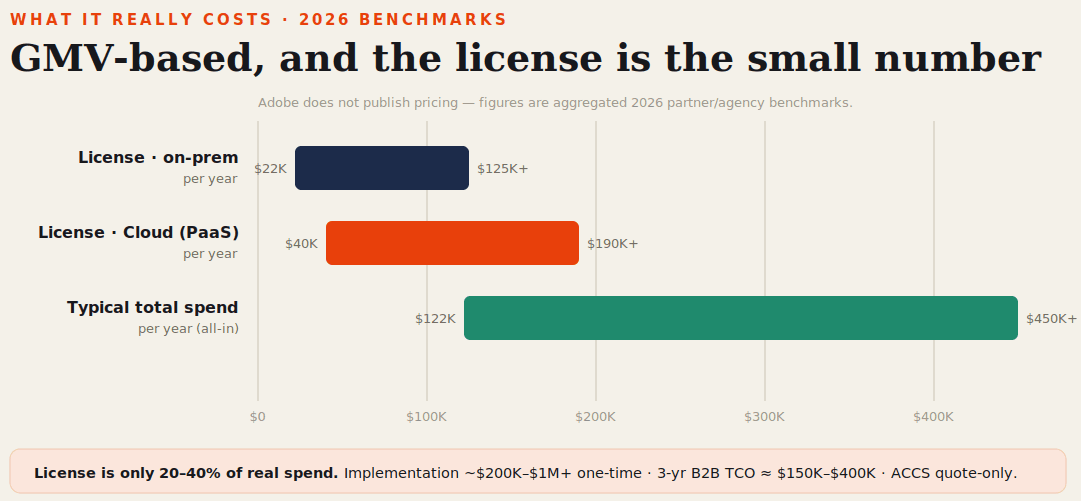
Adobe doesn't publish pricing. It's a custom, GMV-based quote through Adobe's sales team, so you can't drop a clean number into a board deck without asking. Based on 2026 partner benchmarks:
| Component | 2026 benchmark | Notes |
|---|---|---|
| License (on-prem) | ~$22K to $125K+ / year | Scales with GMV |
| License (Cloud / PaaS) | ~$40K to $190K+ / year | Managed hosting included |
| ACCS (SaaS) | Quote-only | No public rates yet |
| Implementation | ~$200K to $1M+ one-time | Driven by integration scope |
| 3-year B2B total cost | ~$150K to $400K+ | License is the smaller part |
Three things to keep in mind. The license is usually only 20% to 40% of your real annual spend; integration and implementation are the bigger lines. Open Source carries no license fee but no B2B suite either, and the cost to rebuild those features often beats the license. And ACCS pricing is quote-only for now, widely expected to undercut PaaS infrastructure costs but not yet published.
How a real implementation runs
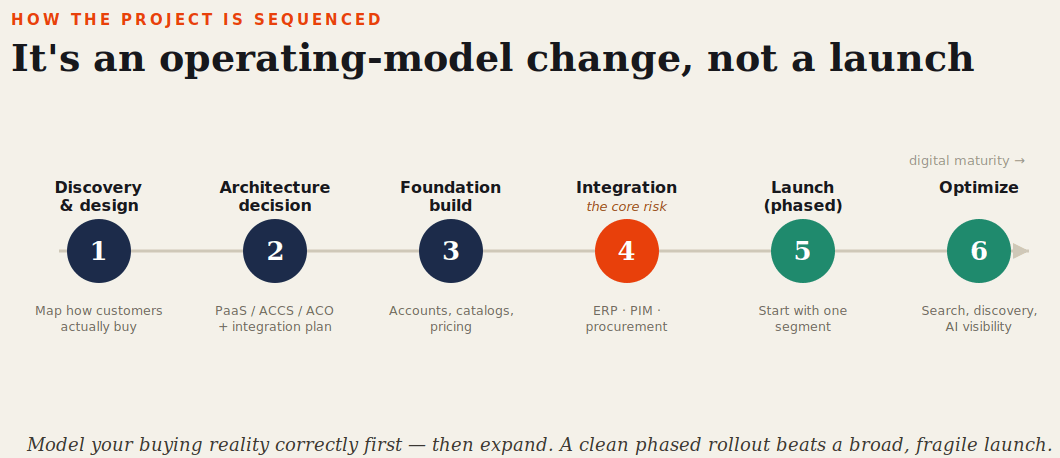
A distributor build isn't a storefront launch. It's an operating-model change. Treat these as overlapping phases, not a strict waterfall.
- Discovery and design. Map how customers actually buy: account structures, approvals, pricing rules, channel mix. Translating that policy into platform structure here is the most important work in the whole project.
- Architecture decision. Pick your model (PaaS, ACCS, or ACO first) and lock the integration plan: what data moves, how often, and who owns it.
- Foundation build. Stand up accounts, shared catalogs, pricing, and the core catalog.
- Integration. Wire commerce to ERP, PIM, and procurement. Test the edge cases hard: cart edits after submission, approval timing, inventory accuracy under load.
- Launch, usually by segment. Most distributors start with one geography or customer segment and expand from there.
- Optimize. Move on to search relevance, discoverability (including AI visibility), and cutting the manual work that quietly erodes margin.
Where these go wrong is predictable: policy never gets configured, ERP integration becomes a phase-two afterthought, pricing complexity gets underestimated, or the team is too thin for the platform's depth. Design around those four and you avoid most of the pain.
On partners, ask for proof on your specific ERP and PIM stack, favor teams that build on App Builder and API Mesh over ones that hack core code, and insist on phased delivery.
If you want a candid read on whether Adobe Commerce fits your catalog, your ERP, and your roadmap, book an Adobe Commerce consultation with our team. We'll walk your actual scenario, not a generic demo.
FAQs
Related Articles


How To Setup Adobe Commerce: Breaking Down the Process For eCommerce Store Owners


What is Adobe Commerce? The ONLY Beginner’s Guide You’ll Need


Is Adobe Commerce Right for Your Business? An Honest Review with Everything You Need to Know!

